.svg)

January 2020 Newsletter
Paperclips are handy, but have you used one to troubleshoot an oceanographic sensor? When you’re unable to communicate with your instrument, the humble paperclip is one of the first tools that Sea-Bird Scientific’s technical support team reaches for. Learn how to troubleshoot comms with the quick and easy Loop Back Test.
The Loop Back Test
Most Sea-Bird Scientific instruments utilize RS-232 telemetry. This tried-and-tested communication method is common among scientific instruments, and allows users to interact with their equipment via simple terminal software. However, when an instrument is not communicating, the root cause is likely one of four common reasons:
- The cable connecting the instrument to the computer is broken.
- The incorrect serial port is selected in the terminal software.
- The baud rate setting in the terminal software does not match the instrument baud rate.
- Instrument Problems – no power, incorrect configuration, etc.
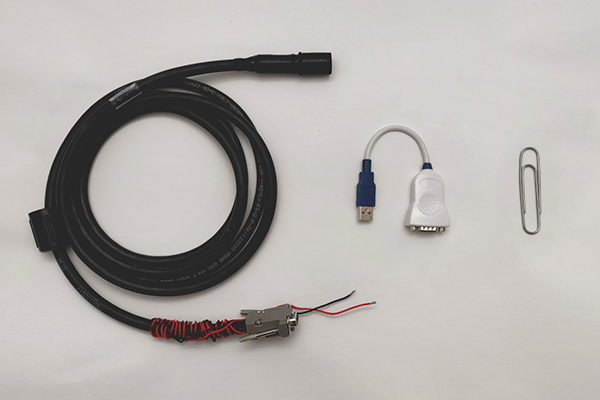
The Loop Back Test can quickly eliminate the first 2 possibilities, allowing you to focus on troubleshooting the instrument itself if necessary. Gather a paperclip, your RS-232 cable, and a USB-serial adapter if necessary. From there, the process is simple:
- Start up the terminal software.
- Connect the communication cable to the computer’s serial port or USB-serial adapter.
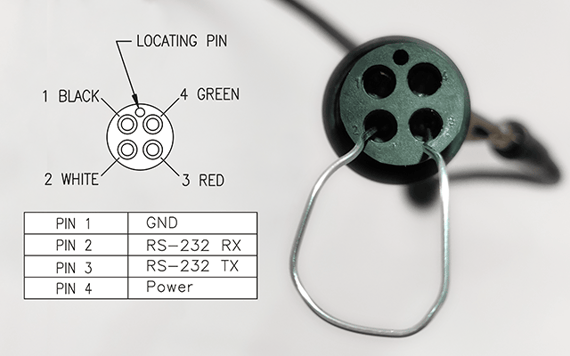
- Using the paperclip, bridge pins 2 and 3 on the cable’s instrument-end (see picture above).
- Type “abcd” into the terminal.
- If “abcd” appears in the terminal, the cable is working and the correct serial port is selected in the terminal program. Reconnect the cable to the instrument and try communicating at different baud rates.
- If these characters do not appear in the terminal, verify that the correct serial port is selected in the terminal and repeat the test. Try a new cable if necessary.
The Loop Back Test bridges the RS-232 Transmit (TX) and Receive (RX) lines. Typing into the terminal sends these characters out the TX line, through the paperclip, into the RX line, and back into the terminal.